How my homelab is set up
Everything I self-host runs on two Proxmox nodes at home, as a few dozen guests split between containers and VMs: my mail, my Matrix server, my password manager, DNS, media, this site, a local LLM, and the lab I used for xdp-bfd. This is how it all fits together.
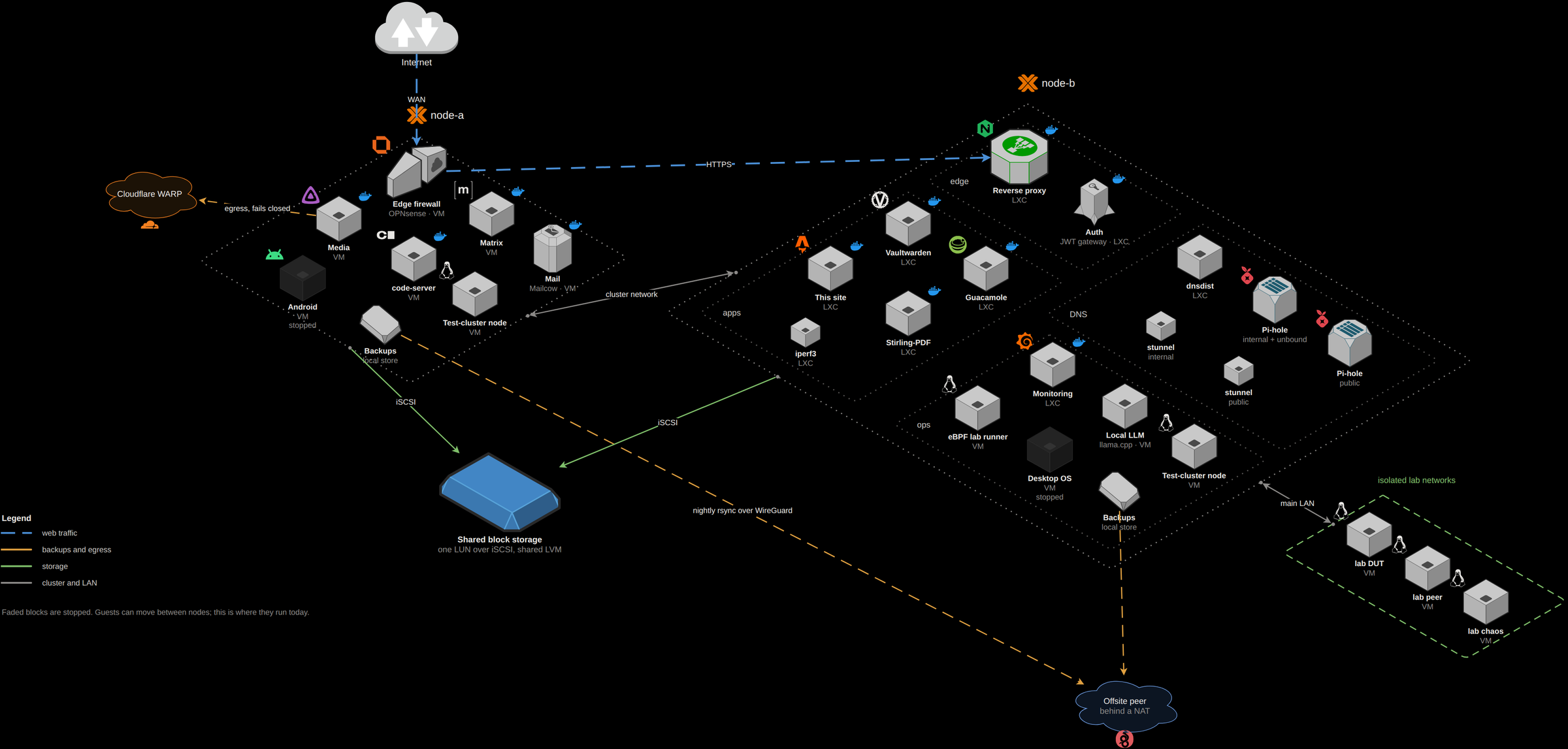
Here’s all of it in one picture, with each guest on the node it’s running on today:
The two nodes
Both nodes are in one Proxmox cluster. Each one has its own ZFS pool for the host, but most guests live on storage that both nodes can see: one LUN over iSCSI, with a shared LVM volume group on it. That’s what lets me move a running guest from one node to the other. I do that by hand, though. The HA manager is running, but I haven’t set any guest up for HA.
Each node talks to the storage over four iSCSI paths, each on its own network. Multipath uses two of them at a time and keeps the other two as standby, and if every path drops for a moment, the guests’ disk I/O just waits instead of erroring out. I don’t bond any links at all. The storage paths are where the redundancy is.
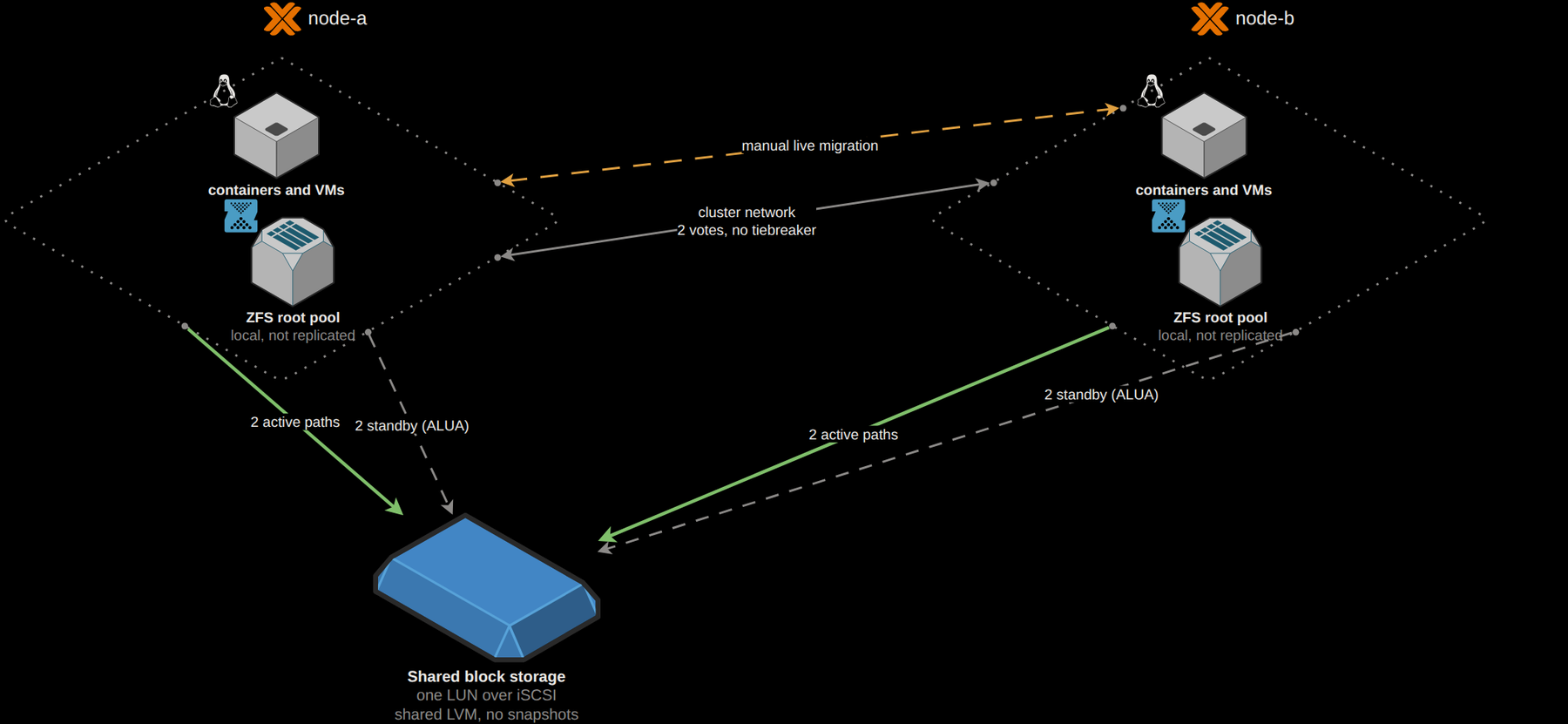
It’s not perfect. With only two nodes there’s no tiebreaker, so if one node goes down, the cluster loses quorum. And plain LVM on shared storage can’t do snapshots, so the guests on it don’t get one before I change something.
Containers or VMs
If something only needs a userspace, it’s a container: the reverse proxy, the whole DNS layer, Vaultwarden, Guacamole, monitoring and this site. If it needs its own kernel or a different OS, it’s a VM: the firewall, mail, Matrix, the media box, code-server, the LLM host and the eBPF lab. Two more VMs are a small test cluster of their own, on the same bridges as the real one.
A lot of the guests run their software in Docker. Synapse and the DNS layer don’t. They run directly on their guests.
The firewall is one of the guests
My edge firewall is OPNsense, and it runs as a VM on the same cluster it routes for. The internet comes in as a tagged VLAN on the hosts’ uplink bridge, and OPNsense routes five internal networks from there: the main LAN, the cluster interconnect, a second private network, a VLAN for testing, and WireGuard, which is how my own devices and the offsite backup box get in. It also hands out DHCP, serves NTP, runs its own resolver, and keeps an OpenVPN tunnel open going out.
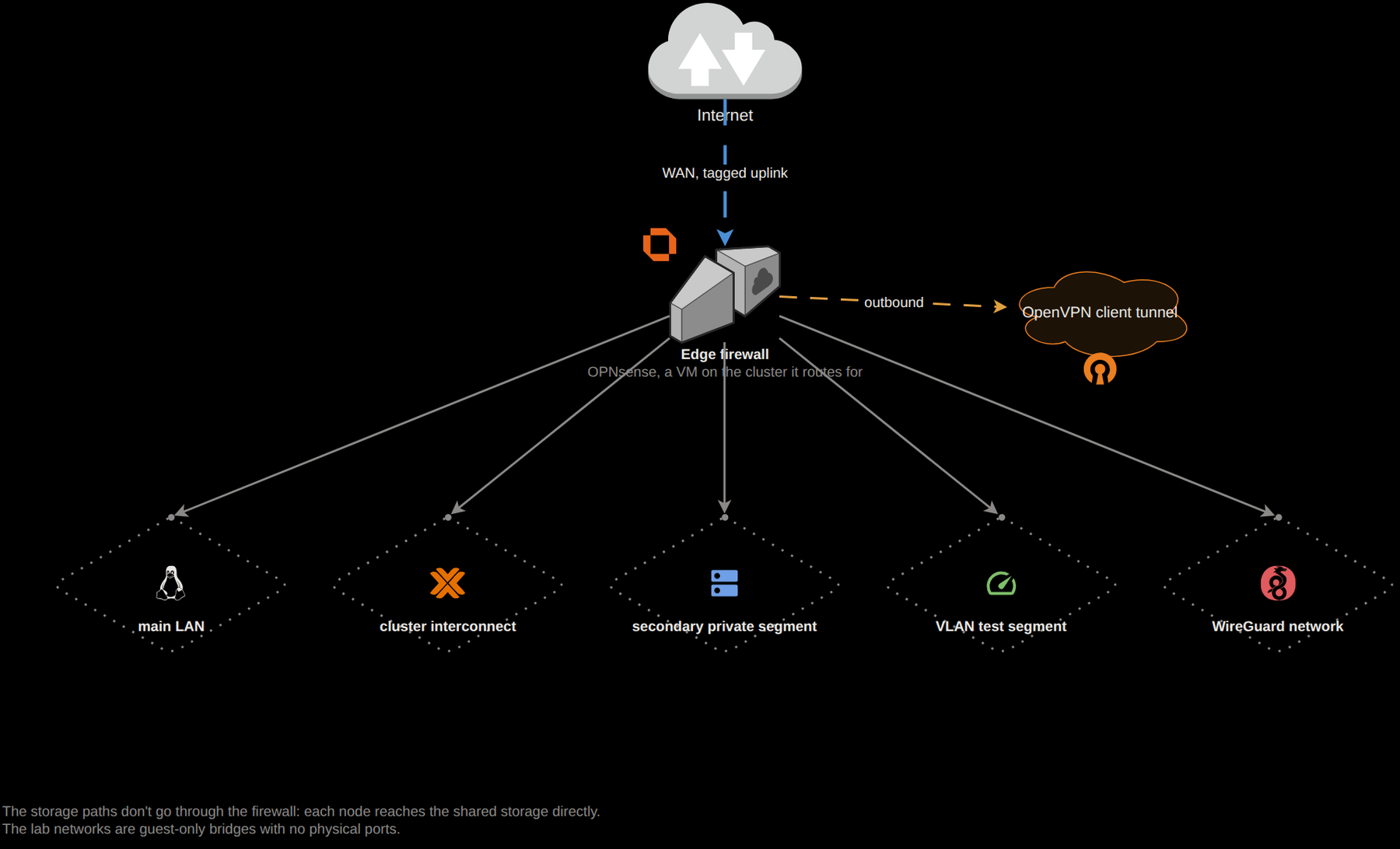
Two kinds of traffic never go through it. The iSCSI paths go straight from each node to the storage, and the eBPF lab has two bridges with no physical ports at all, so its traffic only moves between VMs. The lab VMs are on the main LAN as well, though, so it’s the lab networks that are cut off, not the machines.
One proxy in front of everything
Every web service sits behind one nginx reverse proxy, which has about 70 hostnames on it now. It runs my own nginx image with a JWT module built in.
Most of my services have their own login, so the proxy just passes those
through. A few admin pages don’t have one, and those need a valid token. One
map over the client’s address, the hostname and the user agent decides which
requests need a token, so the same page can be open from home and locked from
outside. Getting that decision to happen at runtime meant changing the JWT
module itself.
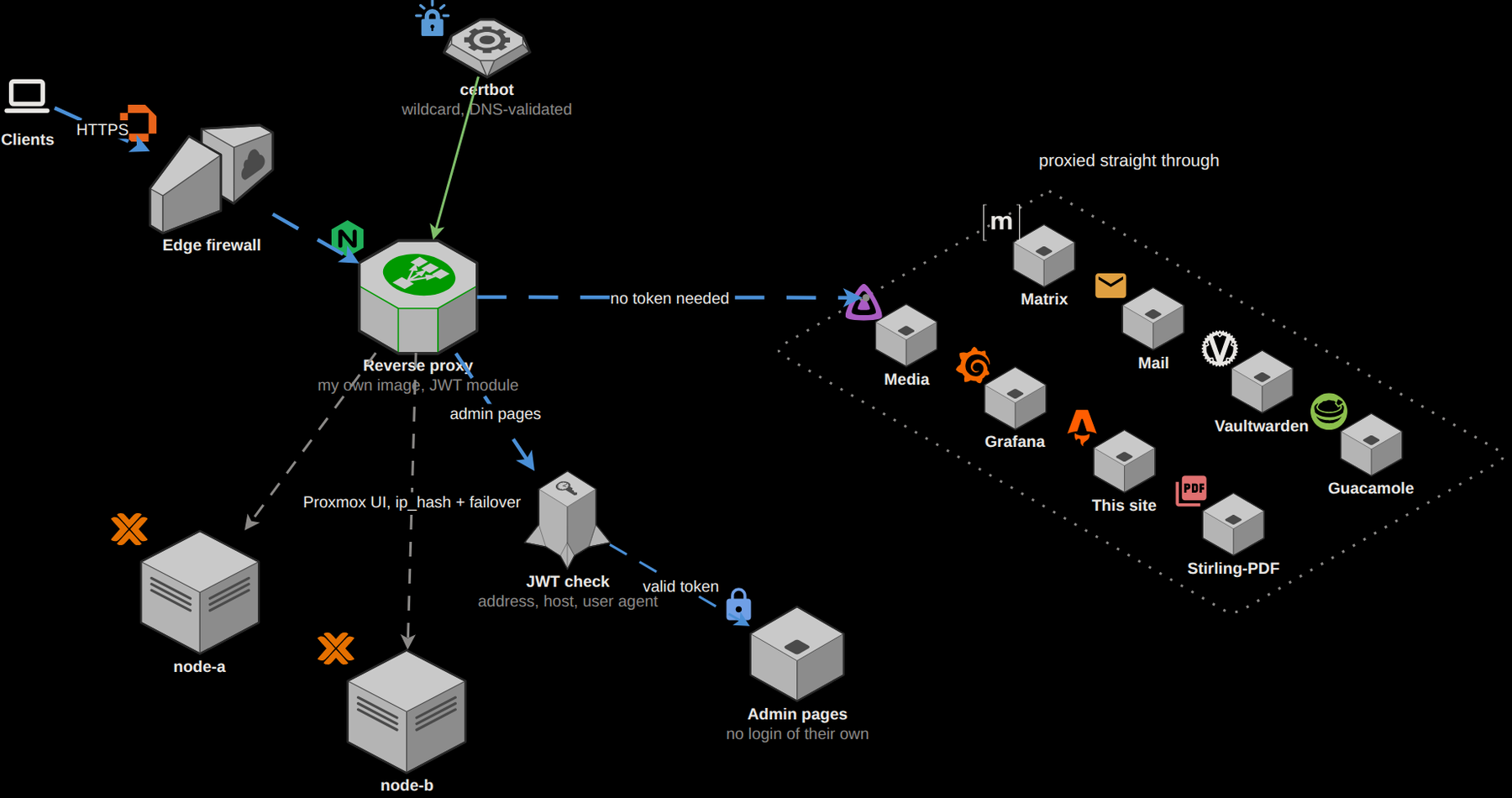
The certificates are wildcards from Let’s Encrypt, and certbot gets them over DNS, so nothing has to be open to the internet for a renewal. The Proxmox web UI is behind the proxy too, as one upstream across both nodes, so if one node stops answering, I end up on the other.
DNS
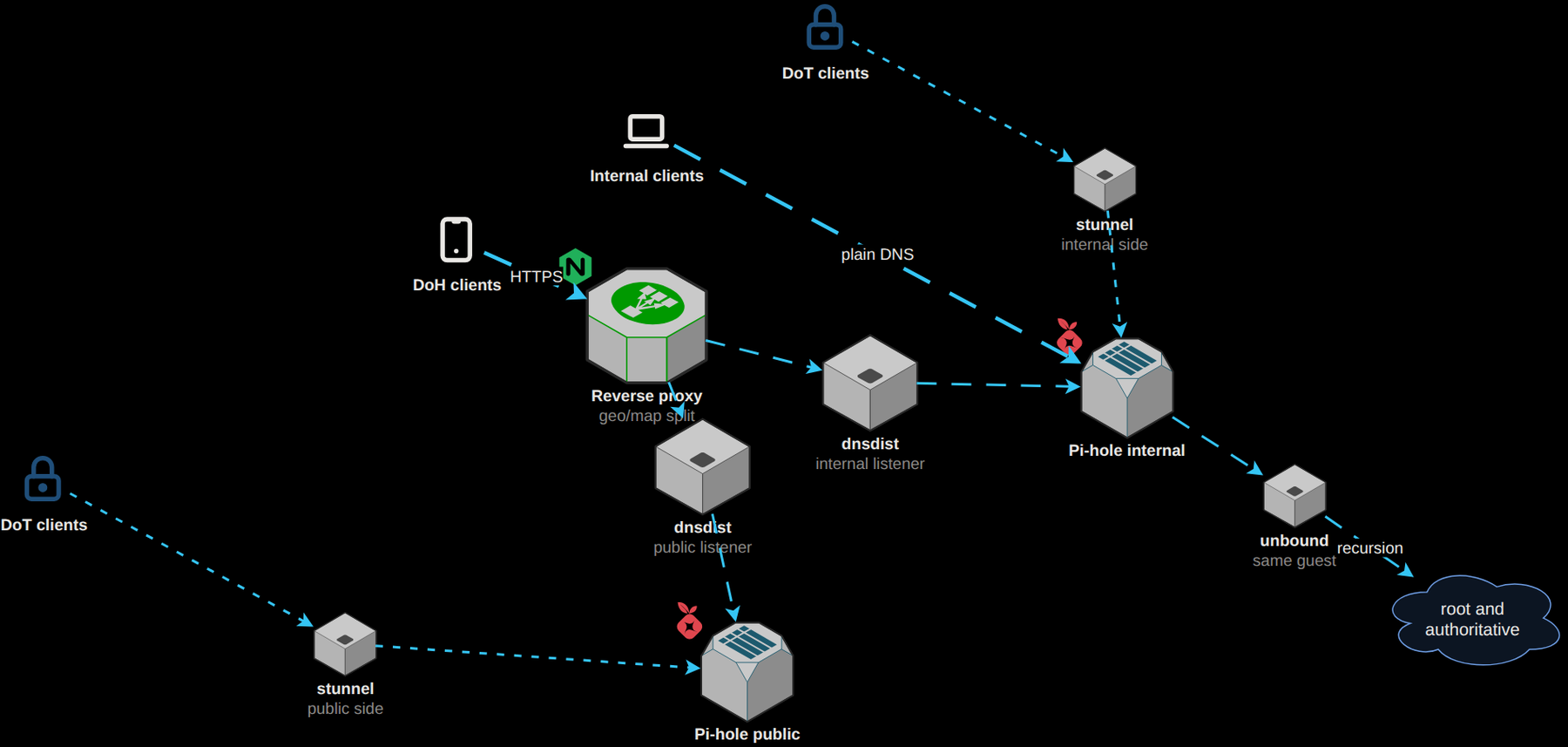
I wanted filtering and full recursion for my own devices, and encrypted DNS with a different filter for anyone outside, so there are two Pi-holes. The internal one has unbound running on the same guest for recursion, and my devices just query it directly.
Encrypted DNS comes in through the proxy instead. A DNS over HTTPS request hits nginx, which picks one of two dnsdist listeners depending on where the request came from, and each listener hands it to one of the Pi-holes. DNS over TLS goes through two stunnel instances, one in front of each Pi-hole.
Mail, chat and the rest
Mail is Mailcow in its own VM, which is 18 containers by itself: Postfix and Dovecot, rspamd and ClamAV, a scanner for Office macros, and SOGo for webmail. Matrix is Synapse with PostgreSQL, plus coturn for calls, all installed straight on the VM, and registration is closed.
The rest is Vaultwarden, Guacamole, Stirling-PDF, code-server, an iperf3 endpoint, a local LLM on llama.cpp, and the media stack, which is Jellyfin, the *arr apps and qBittorrent. The media VM’s traffic goes out through a Cloudflare WARP tunnel with a kill switch, so if the tunnel drops, that traffic stops instead of going out directly.
Monitoring and backups
I only added monitoring on 10 September, long after most of what it watches. It’s Prometheus, Loki, Grafana and Alertmanager in one container, with agents on 19 hosts. Prometheus pulls from the agents instead of having them push, so if a host goes quiet, it shows up as down instead of just going silent. Blackbox probes check things from the outside too, and an alert fires three weeks before any certificate expires.
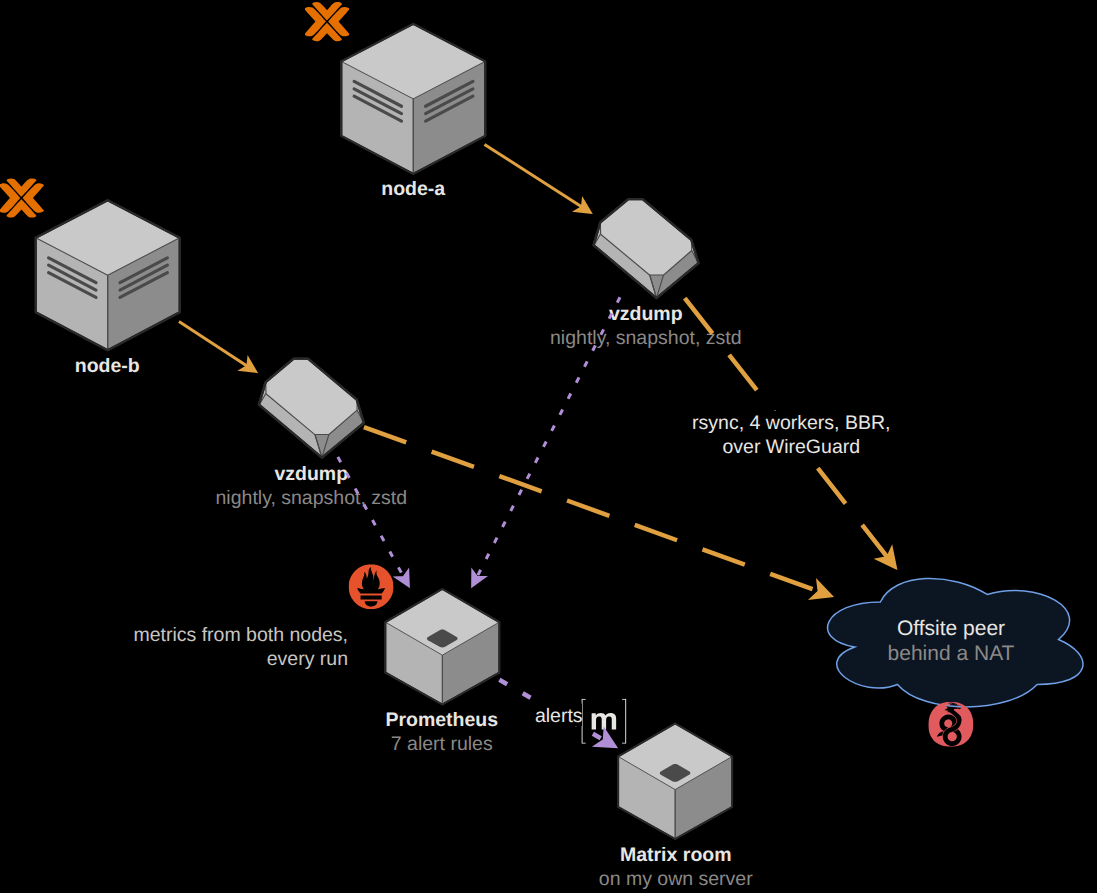
The alerts go to a private room on my own Matrix server. The obvious problem is that if the cluster goes down, the alerts go down with it.
The backups are a nightly vzdump on each node, then an rsync to an offsite box
over WireGuard. That box isn’t always online, so the alert only fires when the
last good sync is more than 48 hours old. The first thing the new monitoring
found was that one node’s sync had been failing every night for 23 days, and
that turned into a much longer story about TCP congestion
control.