Fixing my slow offsite backups over WireGuard
I run two Proxmox nodes at home with 28 guests between them. Every night at
02:00 each node backs everything up to its own disk with vzdump, and a cron
job rsyncs those backups to an offsite box over WireGuard. The offsite box sits
behind a NAT I don’t control, so the tunnel is the only way to reach it. That’s
about 150 GB a night, 91 GB from one node and 59 GB from the other, and it had
been working for months.
23 days of failed syncs
On 10 September I was setting up Prometheus, Loki and Grafana across the homelab with Claude Code, and one of the things on the list was monitoring the backup script. Before writing anything, Claude read the script’s log to see what it looked like. The first node’s log was fine. The second node’s had the same error every night:
rsync: [Receiver] mkdir "/root/backups/node-b" failed: Permission denied (13)
rsync error: error in file IO (code 11) at main.c(791) [Receiver=3.2.7]
The last time it had finished was 18 August, so it had been failing every night for 23 days. Each run failed in under a second and only wrote the error to a log file I never looked at, so I had no idea. 59 GB of backups had never left the box.
I never found out what changed on the offsite box that day. Making the directory exist fixed the error. Before running it again, we made the script report on itself. It now writes its exit code, duration and bytes sent to a file Prometheus picks up, even when it fails, and every step has a timeout. One check took more than I expected. A quick TCP connect to port 22 wasn’t enough, because when the offsite box was half dead, it answered the TCP handshake and then hung in the middle of the SSH handshake. Only a real SSH login with a timeout catches that.
Then it was slow
With the permission fixed, both nodes started a real sync, and both failed after about 100 minutes with rsync’s exit code 30, a timeout while sending. The progress output showed the transfer starting at hundreds of MB/s and then sinking to a few MB/s.
Claude measured the link by piping 400 MB through SSH:
dd if=/dev/zero bs=1M count=400 | ssh peer "cat > /dev/null"That gave 15 Mbps, and then 16 and 17 on the next two runs. From there it decided the link was 16 Mbps, worked out that shipping 150 GB at that speed would take 21.3 hours out of every 24, and told me offsite replication was impossible as I’d set it up. Its suggestions were to move to Proxmox Backup Server or drop the bigger guests from the job.
That didn’t match what I was seeing. 87 GB had already arrived on the offsite box, and the tunnel runs over a 1 Gbps link. So I ran iperf3 over UDP through the tunnel, in both directions:
$ iperf3 -c iperf.example.net -u -b 1000M -t 10
[  5]   0.00-10.00  sec  1.04 GBytes   896 Mbits/sec  0.000 ms  0/943220 (0%)

$ iperf3 -c iperf.example.net -u -b 1000M -t 10 -R
[  5]   0.00-10.00  sec  1.05 GBytes   903 Mbits/sec  0.011 ms  101653/1051648 (9.7%)
About 900 Mbps both ways. If something on the path were limiting it to 16 Mbps,
sending 1000 Mbps of UDP would have lost almost all of it, not 9.7%. The dd
test had only measured one TCP stream going through SSH, and that was slow for
some other reason.
The tunnel was broken too
I also had a ping running from the offsite box back to the homelab, and that showed a different problem. One run lost 33% of its packets, and a few minutes later nothing was getting through at all. The internet from the same box was fine, so I wondered if it was my OPNsense firewall.
The WireGuard status on OPNsense showed the offsite peer’s last handshake was over an hour old. WireGuard renews its handshake about every two minutes while traffic is flowing, so anything past three minutes means the tunnel is dead. The other peers on the same server had handshakes from seconds ago, so the firewall was fine. The difference was that the offsite peer had no persistent keepalive set.
WireGuard doesn’t send anything when there’s nothing to send. The NAT in front of the offsite box forgets the mapping after a short time with no traffic, and after that, my side has no way to reach it. Only the offsite box sending something opens it up again. That’s also why, for months, I’d kept a ping running from the offsite box all the time. Traffic going out from behind the NAT was the only thing keeping the mapping alive, so that ping was doing the keepalive’s job by hand.
I set a 25-second keepalive on both ends, though it’s the one on the offsite box that matters, since it’s the side behind the NAT. The loss went from 33% to zero:
50 packets transmitted, 50 received, 0% packet loss
rtt min/avg/max/mdev = 52.068/52.459/52.879/0.196 ms
Still slow
The backups were still slow with the tunnel fixed, so I measured TCP with iperf3 this time. Towards the homelab it did 502 Mbps with no retransmits. Towards the offsite box, the direction the backups go, it did 41 Mbps with 164 retransmits, and four parallel streams more than doubled that. If the link itself were the limit, four streams would have shared the same 41 Mbps. So something was holding back each single TCP flow.
Next we checked everything in between. OPNsense was 99% idle during the transfer, the MSS was clamped below the MTU on both ends, the offsite box’s CPU was idle, and its tunnel interface had no drops. None of it explained anything, so I swept UDP at a few fixed rates instead, to see what the path itself was doing:
offered  50M  ->  50.0 Mbps   0.029% loss
offered 100M  -> 100   Mbps   0.038% loss
offered 200M  -> 200   Mbps   0.032% loss
offered 400M  -> 400   Mbps   0.033% loss
400 Mbps went through with 0.033% loss, about 3 packets in 10,000. The path was fine.
Why one TCP flow was slow
That much loss is nothing to UDP, but it hurts a single TCP flow over a 52ms round trip. Both of my nodes were using cubic, the default congestion control on Linux, and cubic treats every lost packet as a sign of congestion and cuts its sending rate. With a steady trickle of loss over a long path, it never gets to speed up.
There’s a rough formula for this, from Mathis: throughput is about MSS divided by RTT times the square root of the loss rate. With a 1200-byte MSS, 52ms and 0.033% loss, that comes out at about 10 Mbps. With almost no loss, the same path allows about 584 Mbps. Cubic actually got around 38, more than the formula says, probably because the formula assumes an older and more cautious algorithm, but it’s nowhere near 584.
BBR works differently. Instead of slowing down on loss, it measures how fast the path is and how long the round trip takes, and sends at that rate. So I tried both, one stream each, in the same minute:
$ echo cubic > /proc/sys/net/ipv4/tcp_congestion_control
$ iperf3 -c 10.0.0.2 -t 10
[  5]   0.00-10.00  sec  36.5 MBytes  30.6 Mbits/sec  312   sender
[  5]   0.00-10.04  sec  33.4 MBytes  27.9 Mbits/sec        receiver

$ modprobe tcp_bbr
$ echo bbr > /proc/sys/net/ipv4/tcp_congestion_control
$ iperf3 -c 10.0.0.2 -t 10
[  5]   0.00-10.00  sec   473 MBytes   396 Mbits/sec  1999  sender
[  5]   0.00-10.04  sec   472 MBytes   394 Mbits/sec        receiver
27.9 Mbps with cubic, 394 with BBR. The retransmits went up, from 312 to 1999. BBR was losing more packets, but it didn’t back off each time. Through SSH, the same 400 MB test from before now ran at 200 Mbps instead of about 20.
The fix
The fix was three lines of sysctl on both nodes:
# /etc/sysctl.d/99-homelab-tcp.conf
net.core.default_qdisc = fq
net.ipv4.tcp_congestion_control = bbr
net.ipv4.tcp_wmem = 4096 16384 33554432
fq is the queueing discipline BBR is designed to work with, since it does the
packet pacing BBR relies on. The bigger send buffer is a separate, smaller
thing. The old 4 MB limit capped a single flow at about 645 Mbps over this path,
which wasn’t the problem here, but there was no reason to keep it. I also added
tcp_bbr to /etc/modules-load.d/ so it loads after a reboot.
After that, both nodes finished. The second node was in sync after 9 minutes, its first clean sync since 18 August, and the first node after 18, 69 GB image included. The earlier runs had already got 87 GB across before timing out, so these two only had to finish the job. They moved 57.7 GB between them, which is an average of 285 Mbps through rsync and SSH. At that rate, the full 150 GB that was supposed to need 21.3 hours a day takes a bit over an hour.
The other changes
A few other things I changed along the way were really workarounds for cubic,
from before I knew it was cubic. I switched rsync from --inplace to
--append-verify, so a resumed 69 GB file appends from where it stopped instead
of comparing both copies from the start. I split the sync across four parallel
rsync workers, which went from 19 Mbps to 58, because each stream gets its own
congestion window. And I switched SSH to chacha20, which was about 20% faster on
these CPUs. I kept all three anyway.
The monitoring
The monitoring I was setting up in the first place is running now too. The backup script reports how long each run took, how much it sent and how it exited, and Grafana shows that for both nodes:
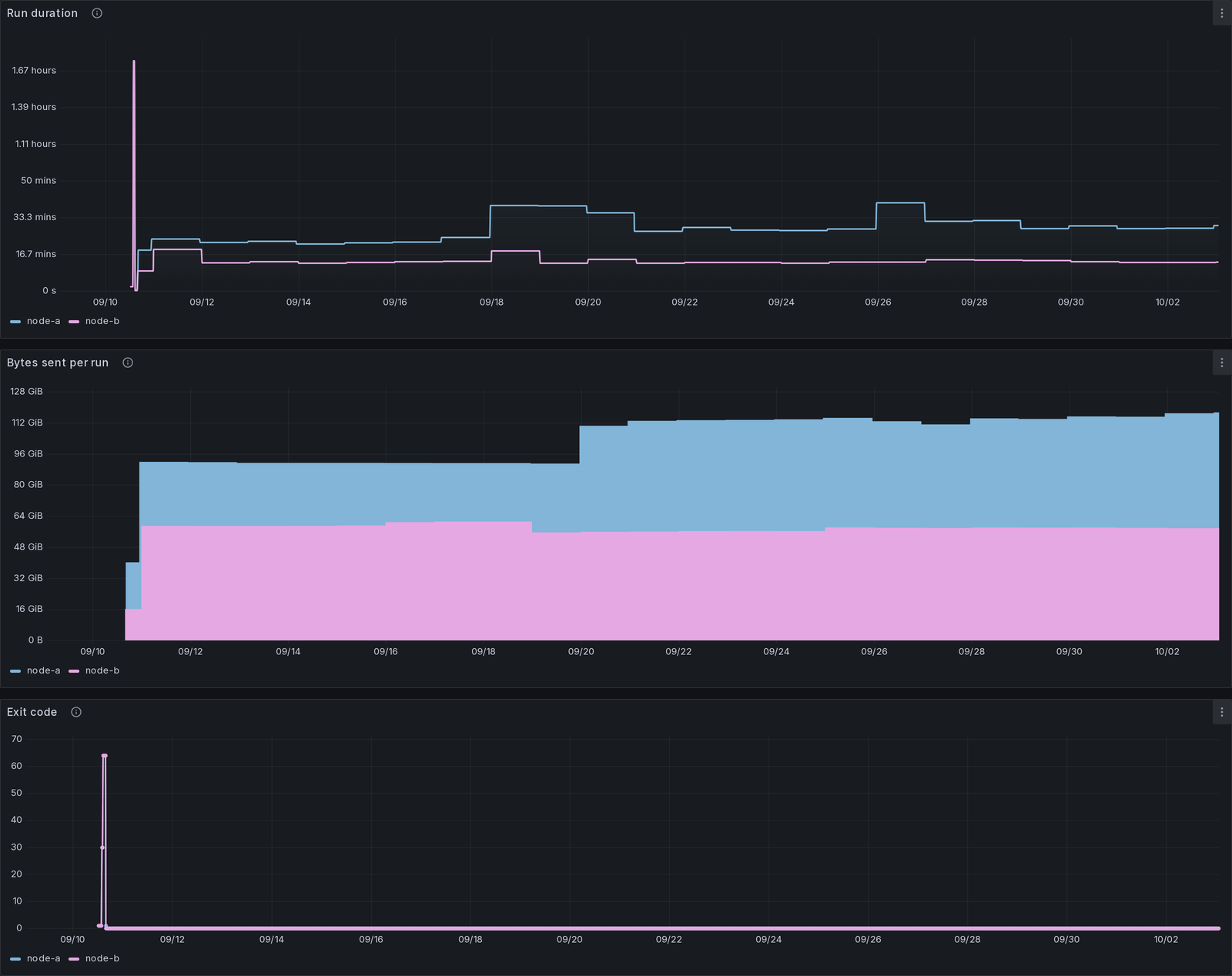
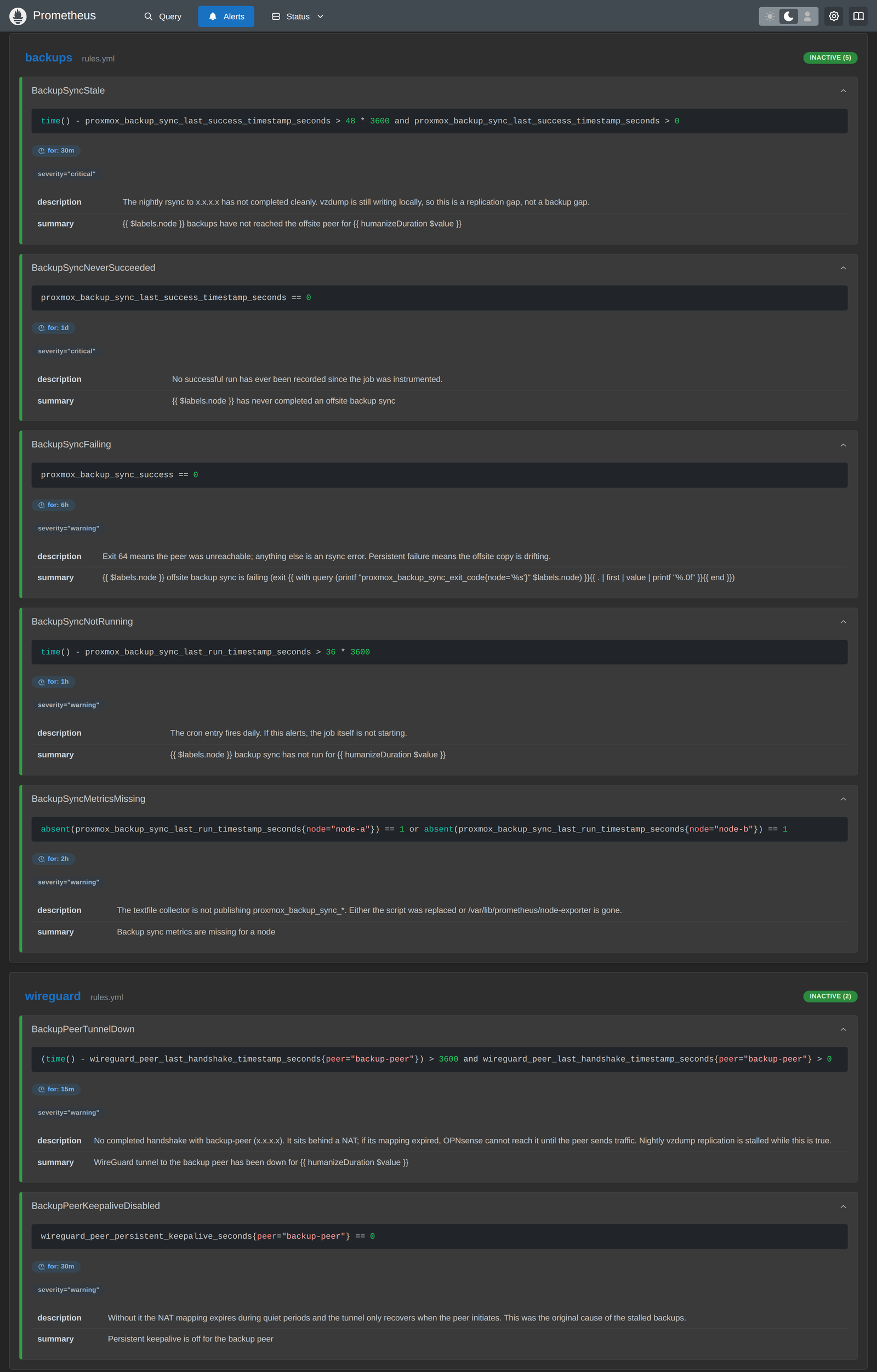
There are seven alert rules around it. The main one fires when the last successful sync is more than 48 hours old, since the offsite box going offline for one night is normal and three nights isn’t. Two of them watch the backup peer itself, one for its WireGuard handshake going stale and one for its keepalive being turned off.